

TM 5-2420-231-10
0004
RIGHT HAND INSTRUMENT PANEL - Continued
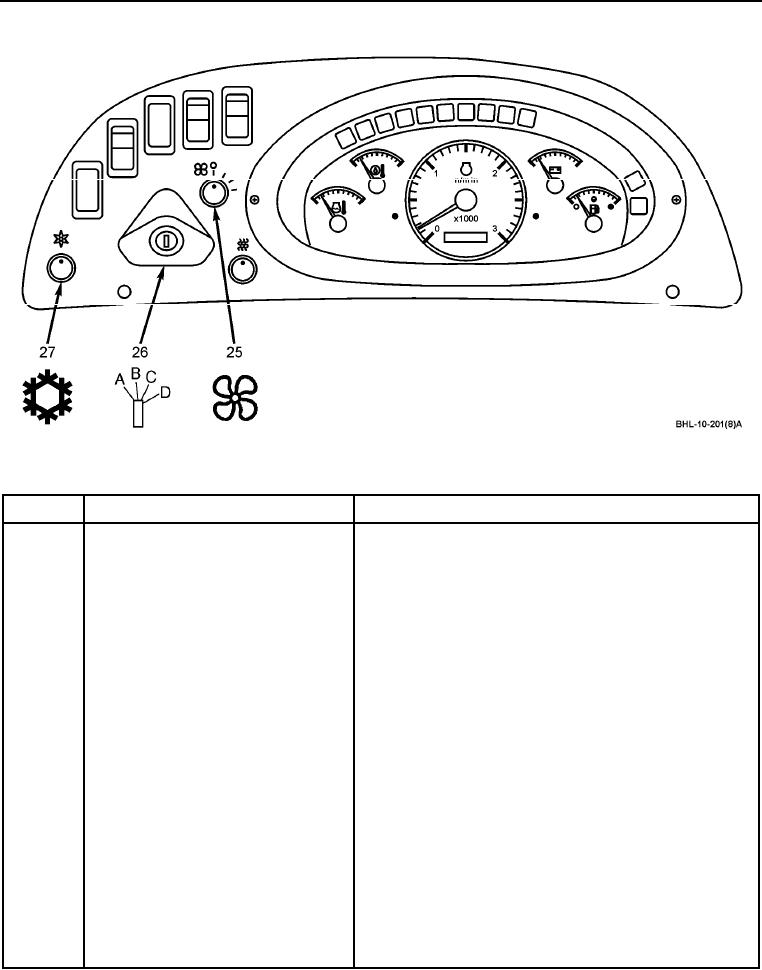
Figure 1. Right Hand Instrument Panel Controls/Indicators (Sheet 7 of 7).
Table 1. Right Hand Instrument Panel Controls/Indicators - Continued.
KEY
CONTROL/INDICATOR
FUNCTION
25
Blower fan switch
Turn switch to center detent for low fan speed; fully CW
for high fan speed; completely CCW to OFF position to
stop fan.
26
Starter key switch (4-position)
Position A
ACC - Turn key CCW from OFF position to ACC position
to provide power to accessories.
Position B
OFF - Turn key to OFF position to shut engine off.
Position C
ON - Turn key CW to ON position. Before starting engine,
check status of all warning lamps. Use voltmeter gage to
check battery condition.
Position D
START - Turn key completely CW to actuate starter
motor. After engine starts, release key, which will
automatically return starter key switch to ON position.
NOTE
Air conditioning should produce air approximately
10F cooler than outside air temperature.
27
Air conditioning temperature switch
Controls air conditioning output temperature. Turn switch
CW to decrease temperature in cab; turn switch
completely CCW to turn off.
END OF WORK PACKAGE
0004-8