

TM 5-3805-290-23-2
ENGINE ELECTRONIC CONTROL MODULE (ECM) REPLACEMENT - CONTINUED
0053 00
REMOVE ECM - CONTINUED
N OT E
If necessary, cut tiedown straps to access the back of the ECM connector.
6.
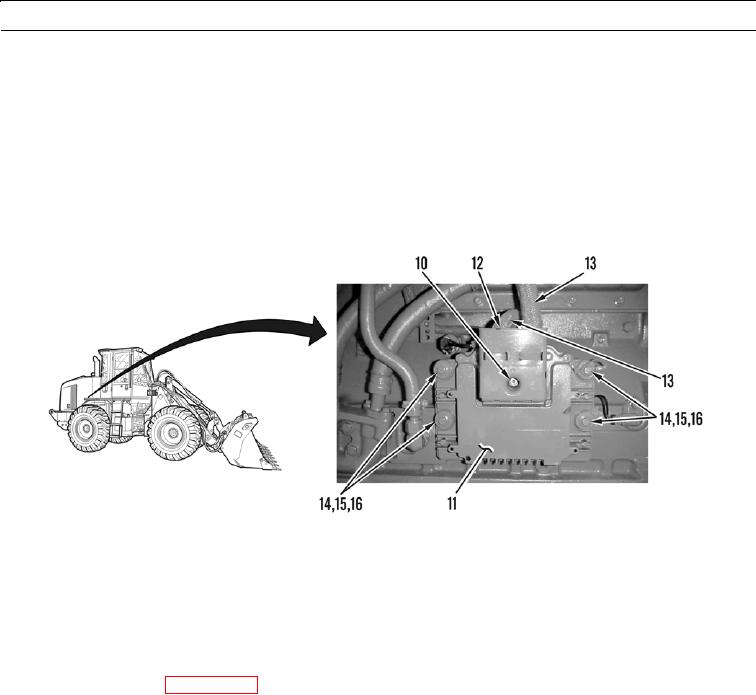
Loosen socket-head screw (10) on ECM (11) and remove cover (12).
7.
Disconnect wiring harnesses (13) from ECM (12).
8.
Remove four nuts (14), washers (15), and grommets (16) from ECM (12).
9.
Remove ECM (12) from machine.
427-B0661-1
10.
Proceed to Install ECM in this work package.
INSTALL ECM
1.
Install ECM (12) on machine.
2.
Install four grommets (16), washers (15), and nuts (14) on ECM (12).
3.
Connect wiring harnesses (13) to ECM.
4.
Tighten socket-head screw (10) to 55 lb-in. (6 Nm) and install ECM cover (12).
5.
Connect battery cables (WP 0079 00).
6.
Install bottom cover (9), four washers (8), and bolts (7).
7.
Position top cover (4) and install two washers (2) and bolts (1) on bracket (3).
8.
Install washer (6) and bolt (5) on top cover (4).
9.
Proceed to Flash Programming in this work package.
0053 00-5