

TM 5-3805-298-23-4
0358
FRONT WIPER MOTOR REMOVAL
000358
1. Remove cab dash (WP 0366).
2. Remove front wiper arm in this work package.
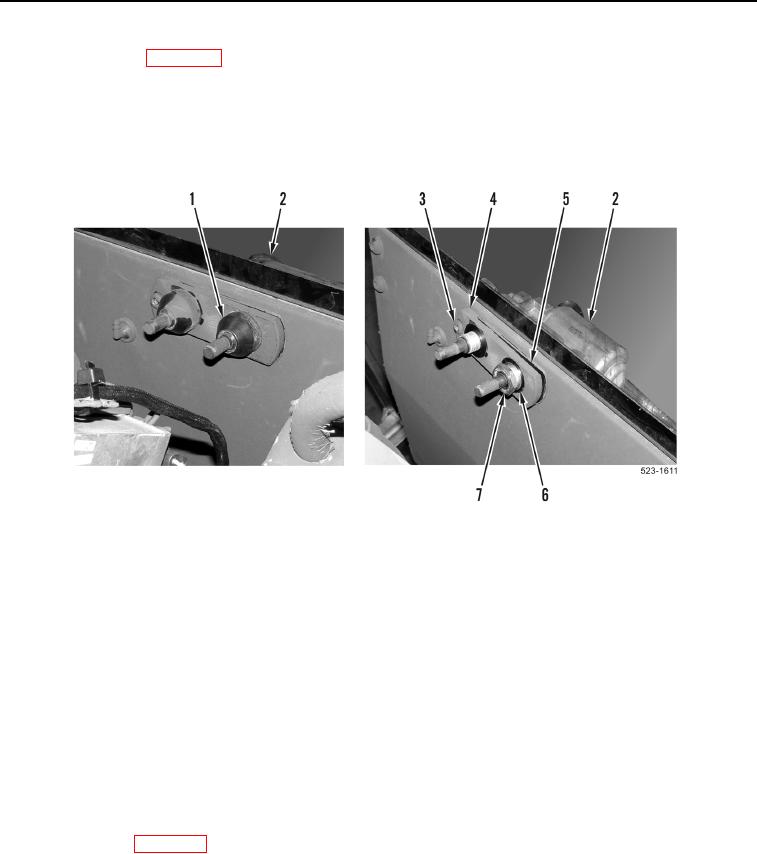
3. Remove two plastic caps (Figure 3, Item 1) from front wiper motor (Figure 3, Item 2).
4. With assistance, remove nut (Figure 3, Item 7), washer (Figure 3, Item 6), bolt (Figure 3, Item 3), plate
(Figure 3, Item 4), gasket (Figure 3, Item 5) and wiper motor (Figure 3, Item 2). Discard gasket.
Figure 3. Front Wiper Motor.
0358
END OF TASK
CLEANING AND INSPECTION
000358
Clean and inspect all parts IAW Mechanical General Maintenance Instructions (WP 0172).
END OF TASK
FRONT WIPER MOTOR INSTALLATION
000358
1. With assistance, install front wiper motor (Figure 3, Item 2), new gasket (Figure 3, Item 5), plate (Figure 3,
Item 4), bolt (Figure 3, Item 3) washer (Figure 3, Item 6), and nut (Figure 3, Item 7) on machine. Torque nut to
168 lb-in. (19 Nm).
2. Install two plastic caps (Figure 3, Item 1) on front wiper motor (Figure 3, Item 2).
3. Install front wiper arm in this work package.
4. Install cab dash (WP 0366).
END OF TASK