

TM 5-2420-231-23-1
0034
Table 1. Parking Brake Indicator Fault - Continued.
034
MALFUNCTION
TEST OR INSPECTION
CORRECTIVE ACTION
Parking Brake Indicator
Test Step 4. Check for Faulty
Fault - Continued
Instrument Cluster.
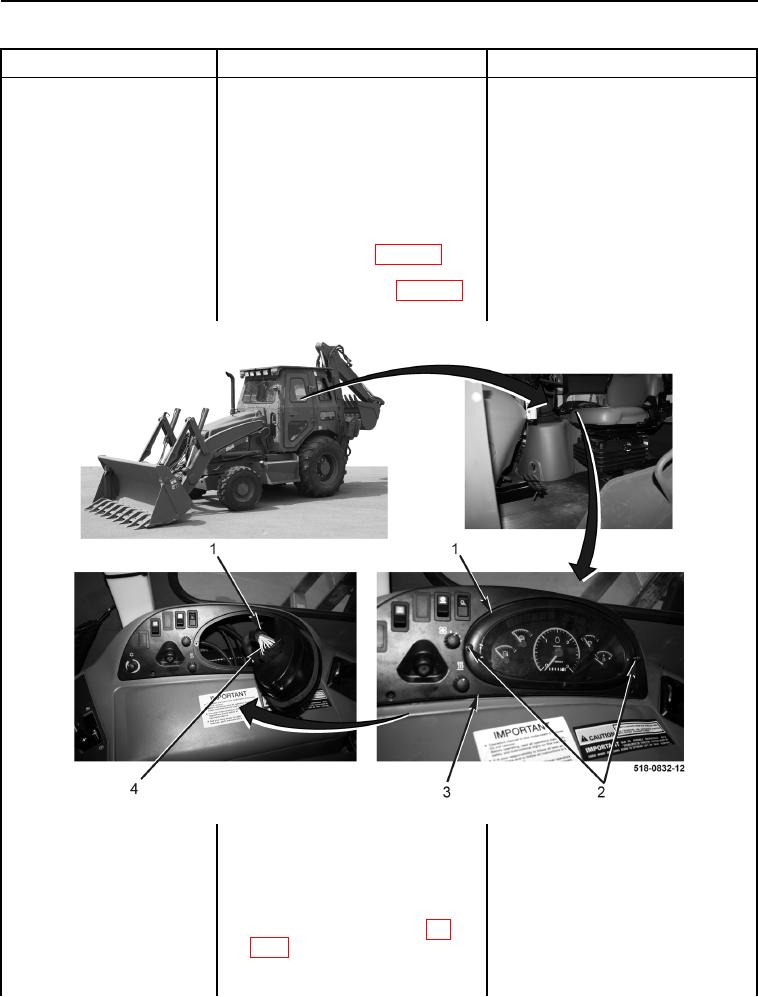
1. Remove two screws (Figure 4,
Item 2) from instrument panel clus-
ter (Figure 4, Item 1), pull instru-
ment panel cluster (Figure 4,
Item 1) from bezel (Figure 4,
Item 3), and disconnect side con-
sole wiring harness connector
(Figure 4, Item 4) (WP 0007, Fig-
ure 28) from instrument panel clus-
ter (Figure 4, Item 1) (WP 0007,
Figure 29) (WP 0177).
Figure 4. Instrument Cluster.
0034
2. Apply and hold service brakes and
release parking brake lever (TM 5-
2420-231-10).
3. Using a digital multimeter, test for
Continuity - Proceed to Test Step 5.
continuity between side console
No Continuity - Replace instrument
wiring harness connector (WP
cluster (WP 0177).
0007, Figure 28) terminals 7 and
Install front instrument panel right-side
36. There should be no continuity.
cover (WP 0176).
Proceed to Test Step 10.