

TM 5-3805-291-10
DESCRIPTION AND USE OF OPERATOR CONTROLS AND INDICATORS - CONTINUED
0004 00
RIDE CONTROL
0004 00
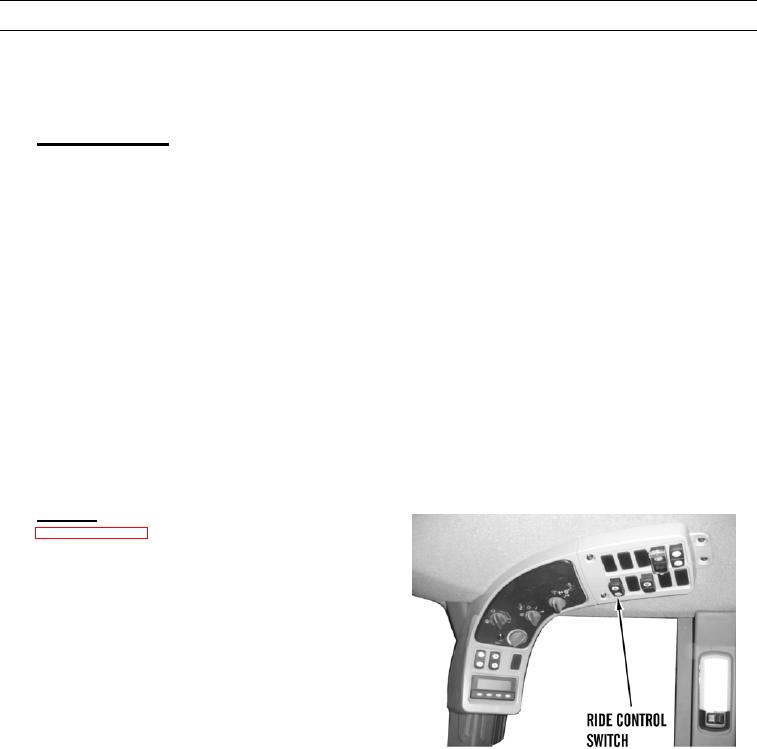
Travel at high speeds over rough terrain may cause bucket movement and a pitching motion. The ride control system acts
as a shock absorber by dampening forces from the bucket. This helps to stabilize the entire machine. Ride control switch is
located on the switch panel.
1.
Ride Control Switch.
WARN I N G
Never perform loading operations with ride control switch in ON (manual) position. Failure to do so
may result in injury to personnel.
a.
Manual Ride Control Press the bottom of switch in order to turn on the ride control system at all travel speeds.
Indicator will be illuminated.
b.
Automatic Ride Control Press the top of switch in order to activate the automatic ride control system. The ride
control system will automatically turn on if the ground speed exceeds 6 mph (9.6 kph). The ride control system
will automatically turn off if the ground speed is less than 6 mph (9.6 kph) and if the bucket is being operated.
c.
Place switch into the middle position in order to turn off the ride control system completely. The ride control sys-
tem should be in the automatic mode or in the off position during loading operations.
d.
Ride control is enabled by a programmable parameter via Electronic Technician (ET). Ride control is enabled
when operator places ride control switch in ON or AUTO position. In ON position, ride control is activated at all
times and powertrain ECM continuously energizes ride control solenoid. This mode should only be used when
machine is being serviced. Never perform loading operations with ride control switch in ON position. In AUTO
position, ride control is activated when machine ground speed increases above approximately 6 mph (10 kph). In
AUTO position, ride control is deactivated when machine ground speed is below approximately 5.5 mph (8.8 kph).
Default speed can be changed in ET configuration screen.
Indicator. Ride control indicator (see callout 14 on
2.
Page 0004 00-23) will illuminate only when the ride
control system is on.
427-C0474